10 Years of the candler blog
I don’t remember starting this website. I really don’t. What I remember, mostly, is learning web publishing while I had a decent amount of free time on my hands at one of my first jobs out of college. Once I figured out how to host my own blog, I transferred a bunch of my MySpace posts to my personal site and kept at it, writing reviews and observations regularly.
The candler blog was an idea that incubated for years. The original concept was as simple as it was lofty: people working in the film industry writing about film. Think Cahiers du Cinema meets Projections, but for my film school friends. I had planned on calling it just “The Candler,” and I worked through a few ideas to print it, like a newsletter, before giving up on it.
Until one day I just up and started the site. No urls for “The Candler” seemed available, so I added “blog” to the name, worked up a design incorporating a recent photo of mine, and just put the thing online. A full decade later, here it is, still going, at least in some fashion.
When I think on the impact this site has had on my life, I almost can’t believe it. It was through this site that I found my way into being an editor for Heeb Magazine, from there writing for a variety of different outlets. I’ve interviewed filmmakers and movie stars, I’ve covered film festivals and movie premieres. My writing here helped link me up with the team behind Fountain, the plain-text screenwriting syntax I played the smallest role in getting off the ground.
It was this site that opened the door to covering SXSW for me, which brought me to Austin a few times, giving me the confidence to actually leave NYC when the time came. So now I live in Texas, where I met my wife and set down roots.
It’s a strange thing. I’ve tried various advertising models on the site, and I’ve been paid for my freelance writing, yet I never found a way to make the site generate any meaningful income. I have worked in post-production all these years, maintaining (or trying to, at least) the candler blog through it all. This website has never been my livelihood, and yet it feels as though my career would be nothing without it.
For ten years this site has been my little plaything. To the readers who have been here this whole time, or have just showed up today: thank you for coming around to my little pocket of the web. You helped keep this little project going so many times, whether you knew it or not.
And so, it’s 2019. The web is certainly changing, but not so much that a simple blog can’t find a few readers. I’ll keep this thing going for as long as I can. I hope you’ll be back to see what I’m up to.
A Conversation With Myself Regarding Documentary Cinema
As the dueling documentaries on Netflix and Hulu about the failed Fyre Festival went live, I knew I’d be goaded into watching at least one of them. I had no interest as the story seemed to have been told plenty of times already. And yet, as more and more friends started talking about it, I figured it was time to watch one.
I picked Netflix’s Fyre, directed by Chris Smith. The film dredged up a number of thoughts about documentary cinema and how we watch and process non-fiction media. Instead of reviewing the film itself or composing an essay, I decided to make my internal monologue a little more external.
So here is a conversation between myself and myself, parsing my feelings on the matter. If this isn’t helpful, I have only myself to blame.
I’m wondering why you say you didn’t even want to watch either film on the Fyre Festival. The idea that you would balk at taking the time to watch a feel makes you sound rigid, incurious.
That’s a fair point but not one that’s really going to change my mind. I would say it’s less that I’m incurious and more that I have a disinterest in watching something that I would rather read.
Read?
So many documentaries today, especially those that are made for television, feel as though they would be better served by a lengthy magazine article. I don’t see what the moving image adds to the story.
I’m going to come back to your “made for television” sideswipe later…
We can talk about it now…
…I think you’re being obtuse when you say you don’t see what the moving image adds. It adds, of course, the moving image. It makes it sound as though you would discount the entire advent of cinema since, well, we have books and theater; why have a new thing?
Except you’re exactly right. You’re agreeing with me without seeing it. The cinema is not literature, it is different. And so is the documentarian a journalist? Hopefully. But bringing pictures to a story, especially now that moving images are everywhere, is only part of it. There must be a story told through pictures, that could not be told another way. Documentary is not illustration, but illumination.
So you do like documentaries?
Of course!
But you’re generalizing that most made today don’t meet your rigid standard?
First of all, I should maybe clarify that my standard, my rigidity as you put it, is merely personal. This is whether or not I like these films, whether I think they’re worth my time to watch. They are a wildly popular form. Clearly no one cares if I dislike 90% or whatever of those that come out.
What are some documentaries that you do like?
Oh, any Frederick Wiseman, the Maysles. I loved Marwencol. Queen of Versailles was enjoyable.
So direct cinema.
Yes, I’m a fan.
Should all documentaries be direct cinema?
If they were, I’d be happier but documentary would still be a niche form.
Okay you referred to Fyre as made for television…
Sure.
Are you making fun of it? In other words, are you trying to take it down a peg by suggesting it’s something other than cinema?
Look, Netflix is a direct-to-video streaming service. This is not necessarily a judgement on the quality of the work, but this is how it works. If there were no awards screening requirements, no Netflix film would ever play in a theater. Why? Because they’re a television network. The proper way to experience Netflix is in the home or on a device.
We will quickly find ourselves in the weeds here, but whatever is on Netflix is television.
Even…
I know what you’re going to say and I guess, yeah, even Roma. I watched it on television. Most people did.
And you think that takes something away from the experience?
Who’s to say? Maybe I would have enjoyed Roma more in a theater. Maybe the same goes for Fyre. But we’ll see. Maybe this year a made for television film will win Best Picture.
See you’re being difficult, clearly. You are trying to poke fun at Roma, a beautiful and cinematic film, because Netflix released it. Why can’t you just judge the film on its merits?
Why isn’t a turtle a giraffe? No one knows. If calling the film that premiered on a television network made for television is bad, I don’t know how we’re supposed to talk about this?
The other end of this is: where do you draw the line? Is every moving image everywhere cinema? Are they all worth our time? Good luck catching up on all your YouTube…
We are off track.
Clearly…
Fyre…
Yes. It’s just a dry retelling, with one exception: everything after the festival. They did a good job there. Finally, three-quarters into the film, we get to something interesting.
So doesn’t that make it worth it then?
You may have me there. But I’d much rather watch something else and not know the ending.
And I feel the opposite.
A Little Bergman Reading
It’s been quite an Ingmar Bergman January for me. I’ve been slowly working my way through Criterion’s monumental box set in chronological order. (I’ve only gotten as far as 1949’s Thirst.) Though I have not begun reading the gorgeous book of essays that accompanies the book, I did, by chance, have reason to read a little bit about Bergman.
The New York Times, for awhile now, apparently, has had a podcast devoted to its Book Review section called, aptly, The Book Review Podcast. Recently, the hosts welcomed the paper’s co-chief film critic A. O. Scott to discuss a new book he reviewed, Unquiet. The novel is a work of fiction by Linn Ullman, the daughter of Bergman and actress Liv Ullman. Per Scott, it is not a salacious autobiography, but a thinly veiled retelling of a girl growing up with monumentally famous parents.
Liv Ullman, of course, is the star of many of Bergman’s most famous films, including my personal favorite (so far!), Autumn Sonata, a devastating but beautiful film. Linn, her daughter, is herself a celebrated writer, though apparently the subject of her parents has long been off limits. She does not, apparently, reveal much in Unquiet. Here’s how Scott describes it in his review:
For readers anticipating a book-length gossip-column blind item — or a score-settling peek into the intimate lives of famous people — “Unquiet” may be disappointing. The real-life celebrity of the almost-fictional characters, including Linn Ullmann herself, several of whose books have been international best sellers, is both a lure and a distraction. … The enigmas of “Persona” and the emotional shadings of “Scenes From a Marriage” are unlikely to be illuminated by any new revelations about their maker and star.
Adding Unquiet to my list of books to read. Next up to view: To Joy.
The Tragedy of American Hatred
Yesterday hurt. Bad.
My heart weeps for the victims of the shooting at Tree of Life*Or L’Simcha Congregation in Pittsburgh, for their families and the entire community affected by this terrible act. Know that you are not alone, that we will make a blessing of the memories of those we lost.
Sadly, we as a nation have crossed another horrific rubicon. Josh Nathan-Kazis reports for The Forward (emphasis mine):
The shooting at the Squirrel Hill synagogues is only the second shooting at a synagogue in U.S. history, and the first that appears to have been motivated by anti-Semitic animus.
Americans live in fear of being gunned down in a public space, be it a school, a movie theater, or even a house of worship. The gun problem here is profligate. So is hate.
In the past few years, American hatred has gone unchecked. Xenophobic fears have been whipped up for political points. Jews remain the most persecuted religious group in this country. Hate is on the rise, including not just the bald-faced racism against immigrants, but anti-Semitic conspiracy theories supported by national politicians.
The Pittsburgh shooter, as we now know, ascribed to one of these theories. He took his anger, grabbed his guns and went out to slaughter Jews. His hatred was always there, but the anger seems to have emboldened him to commit this most horrific act.
I, personally, have been terrified this day would come. Sadly, I know history well enough to be shocked, but not surprised. The day after the 2016 election, I wrote the following:
The lesson passed down to me after a century of unspeakable horror was one of vigilance. Pay attention. Engage. Question. And never, ever forget.
It’s not paranoia that has me feeling this way. It’s experience.
The hatred in America is palpable. Jews have long taken precautions against violent acts. During the High Holidays, it is now common to have a police presence at synagogues across the country, having your tallis bag or purse inspected before entering the building. As large and successful as the American Jewish community is, we know better than to let our guard down. Yesterday was a stark reminder of why.
The story of the American twentieth century and the story of the American Jewish community are intertwined. We came to this country fleeing persecution from all corners of the earth. We have flourished all across this nation. There have been dark days, but none darker than yesterday. All Americans must pause and consider what it means that anti-Semitism could get this bad here. Here.
The tragedy of America today is that too many have become blinded to the hate-filled rhetoric that permeates our discourse. The divisions in this country run so deep, people can’t seem to see the dangers lurking right out in the open. Anti-Semitism, sadly, has a long and documented history. Jewish communities the world over have been attacked as a by-product of anxieties, economic and otherwise, for centuries. But we have the benefit of history; we know how this story unfolds. And we can prevent it.
In Judaism, we have a concept that defines the terrible events that have befallen us: Sinat Hinam, or baseless hatred. Hate without cause has followed us for centuries and decimated us. The anti-dote, it is taught, is Ahavat Hinam, baseless love. To bring love and happiness into the world for no reason is a core Jewish precept. It is no simple task in a world of such darkness. But what is the point of a world without love?
I believe America can be better than this. It starts with education. Reach out to members of your Jewish community. Grieve with us, come learn with us. Celebrate with us. Crucially, when we speak of anti-Semitism, listen to us; hear us. Teach the next generation that hatred will not define America. The stakes are too high. Our lives are on the line.
Horrific Stories From the Border ⇒
Jason Kottke does the hard work of distilling a sprawling national crisis into its most basic parts:
No use sugar-coating it: the federal government of the United States of America now has a policy of taking children away from their families when they attempt to enter the US to request political asylum from violence & hardship in their native countries. These children and their parents are placed into concentration camps.
Read his whole post, which goes through a series of news stories documenting the horrors from the border. Anyone who can hear these stories and feel nothing is beyond saving. It is important we bear witness to this evil. In my lifetime, in my state, the government has thrown children into cages, deliberately and without remorse. This will not be forgotten, and I don’t know how it can possibly be forgiven.
Halide, Darkroom and Rekindling Photography as a Hobby
A few years ago, my photography workflow broke. I can’t remember exactly when, but there was a sort of cascading effect once it became clear Apple didn’t want to support Aperture anymore.1 From there I stopped bringing my Nikon D90 around with me, and my photo collection began to wither.
When Apple first showed off the iPhone 7 Plus with the dual-lens camera and Portrait Mode, it blew me away. I wanted it to become my new, everyday camera. It has been, but until recently was using it exactly as I had all my other iPhones; it didn’t feel like a camera. Two apps, Halide and Darkroom, have changed that for me. I’m having a total blast taking photos again.
The key feature of deluxe camera app Halide, for me, is speed. When you take a photo, you feel a little haptic feedback. The screen doesn’t blink or freeze frame. On to the next shot. It feels almost like shooting with a Leica or other rangefinder. You compose the shot, set focus and exposure, then move on.
If you’ve never shot with a rangefinder, this may seem a bit abstract. With an SLR, you can see what the shot will look like when you compose it; with a rangefinder, you can’t (exactly).2 The result is that you end up training your eye to see what your next photo will look like without looking through an eyepiece. Halide has basically gotten me into that sort of thinking. I’m more dexterous with it than I ever was in Apple’s built in Camera app.
Of course, Halide has a bevy of other features. It can shoot RAW, has manual controls like ISO and shutter speed, and it even has its own take on Portrait Mode, called Depth. I’ve used a number of beefed up camera apps over the years, and Halide is easily the most intuitive to use.
The main feature that blew me away was shooting RAW. Halide’s designer, Sebastiaan de With, has an excellent series on the topic, but here’s a quick example that made me want to shoot everything RAW. Halide allows you to shoot both RAW and JPG, the latter of which will have all the noise reduction and color correction the built in Camera app offers. This is a 100% crop of a photo I took as a JPG.
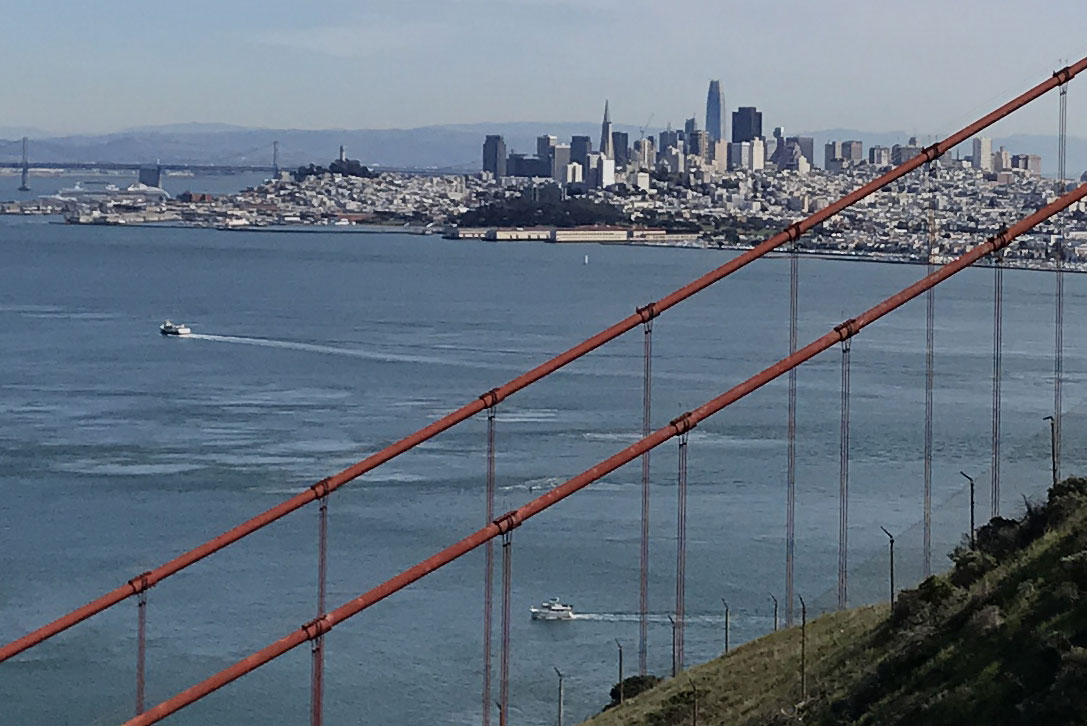
JPG Crop
Now here’s the same photo in RAW.
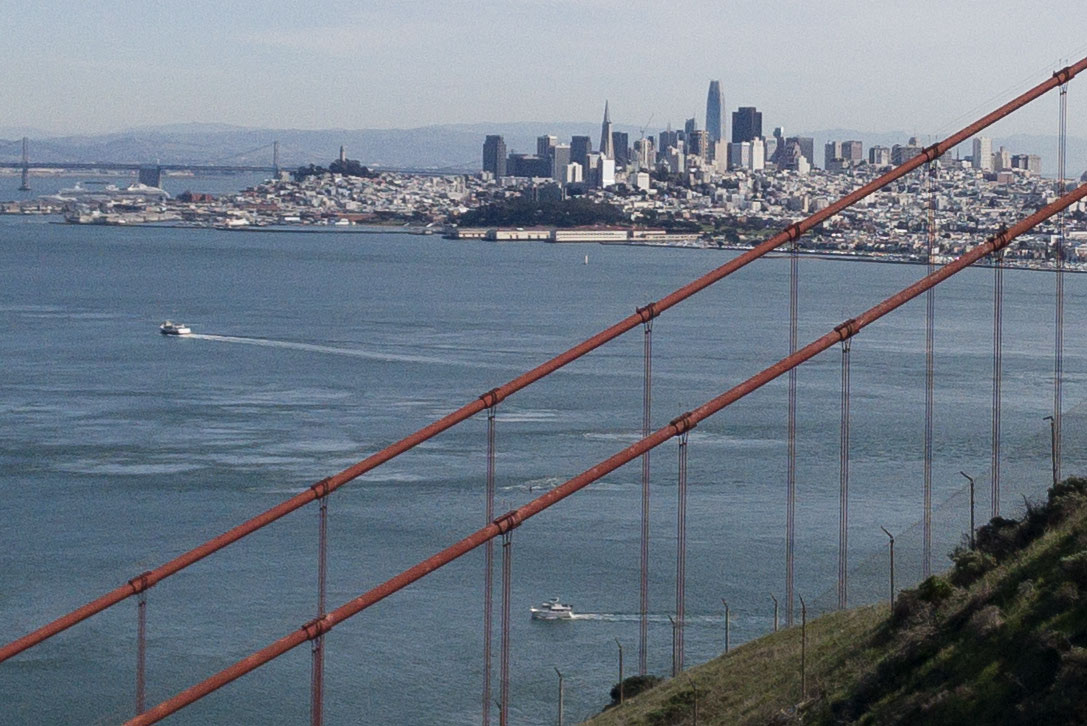
RAW Crop
In this example, the RAW version retains a lot of information that the JPG does away with. Sure, there’s noise, but beneath that noise is a ton of detail. The boats look sharper and each of the cables on the bridge are more distinct in the RAW version. Here’s the whole shot, as edited in Darkroom.

The Full Photo
Darkroom is a fantastic photo editing app that just released a huge update. Besides the photo adjustment tools the app has been honing over the years, they’ve added the ability to adjust the depth map on Portrait Mode photos. This means you can increase or decrease the amount of blur behind your subject. They’ve taken it a step further, allowing you to adjust the edges of what is in the foreground and in the background. And you can even do things like adjust the saturation, brightness and contrast of the foreground and background separately.
I’ve been using the beta for a little while, and this makes Portrait photos a ton more fun to play with. I find that, more often than not, I’m reducing the amount of blur. Portrait mode tends to treat most photos as if they were taken with an 85 or 105mm lens, which is appropriate as these are often referred to as “portrait” lenses (get it?!). But Sometimes I frame a photo that feels a lot more like a 50 or even a 35mm lens. Pulling the blur back allows for a subtler effect mimicking a wider array of lenses. Here’s an example.
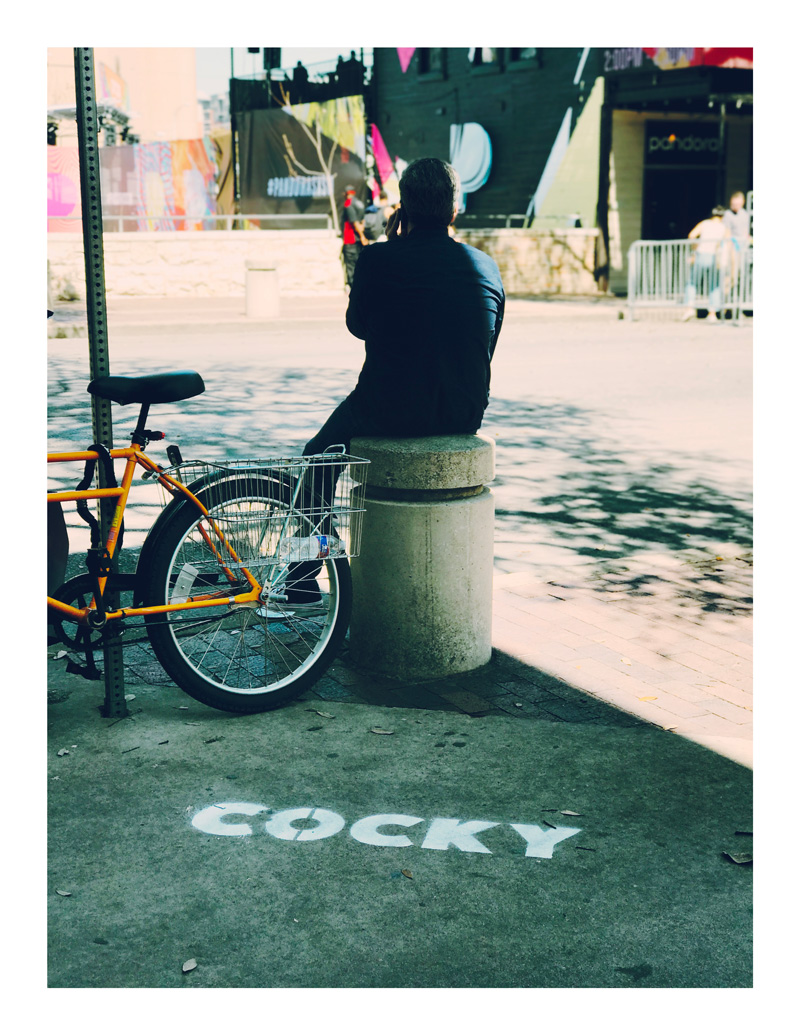
A Portrait Mode Street Photo
The blur adds just enough separation between the subject and the background. This feels a lot more like a photo taken with a street lens, to me at least. It’s more blur than I would get with the lenses on their own, but less than what Apple’s algorithms tend to ask for.
One more portrait photo, taken amid the cacophony of a red carpet before the premiere of Wes Anderson’s Isle of Dogs at SXSW.
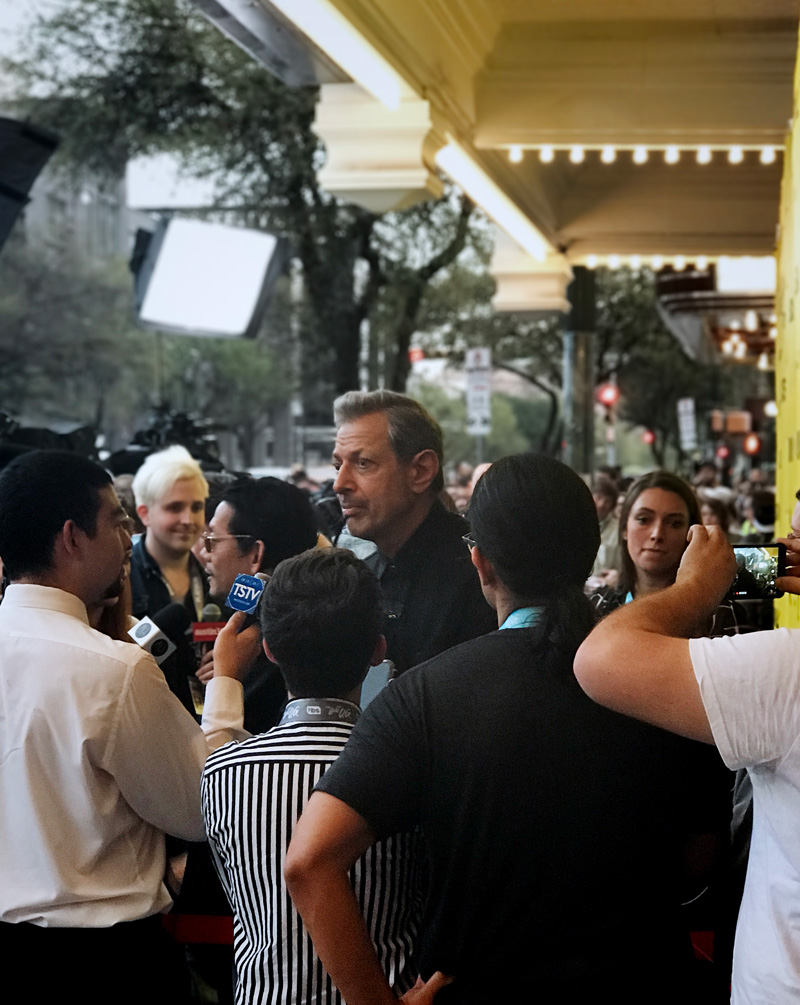
Jeff Goldblum before Isle of Dogs
I felt like I was pushing my phone to the limits, and didn’t think any depth information would show up at the distance I was standing. But somehow it does its little magic and grabs a fairly clean shot. I took some photos with my SLR as well; they’re much nicer, although since I was shooting into lights there was a lot of glare streaking over the subjects. The tiny iPhone lenses didn’t seem as phased by that. But honestly it was just fun to try to get a shot like this on my phone.
There are loads of other features in both of these apps. If you want to read more on them, I suggest Federico Viticci’s recent Halide walkthrough or Darkroom’s own blog. Though made by different companies, they go hand in hand. Each even has the ability to jump to the other app with a single tap.
I still love taking photos with my Nikon D90, but there’s no question that my iPhone is now my main camera. Halide has reinvigorated my little hobby, and Darkroom has made it so I can turn my snapshots into something beautiful right from my phone. I’m excited to see what they add next.
Halide is $4.99 and Darkroom is free with in-app purchases up to $7.99 (you’re going to want to just buy every feature). Go get them and take some great photos.
-
Which, in what has become true Apple “pro” fashion, was well before they actually killed the application off. ↩︎
-
This isn’t a 1:1 analogy. Halide allows you to preview focus live, which a rangefinder would not, and switching to the telephoto lens shows you the telephoto preview. On a rangefinder the frame lines would simply shrink in your eyepiece. Like I said, this is more an abstract feeling than an exact comparison. ↩︎
Ready Player One is a Relevant Spectacle With Little to Say
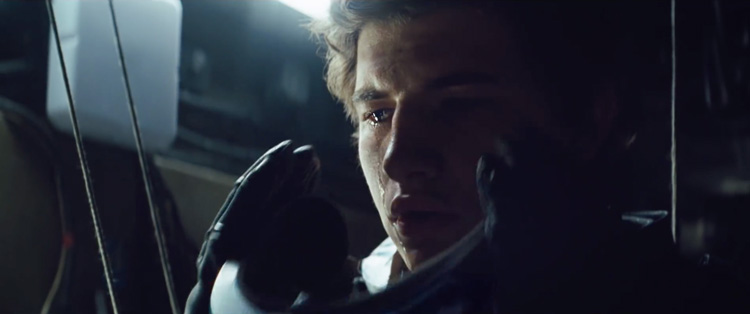
Ready Player One Still
Looking back on my own notes, it seems I enjoyed reading Ernest Cline’s novel, Ready Player One, more than I remember. Over time, it has hardened into a something I don’t particularly like. Beloved for its voluminous pop cultural references, I always found the crutch of stroking nostalgia got in the way of an otherwise straightforward story.
Enter Steven Spielberg, one of the great visual storytellers of our time. His filmed version, which I caught at its SXSW world premiere, cuts through the cruft and puts characters front and center. Fans need not worry, though, this is a faithful adaptation that only improves upon the original. If you wanted to wrap yourself in Cline’s universe, it just got a lot bigger.
The story, written for the screen by Zak Penn along with Cline, takes place in the year 2045. Seemingly all commerce revolves around the OASIS, a virtual reality game world that functions as a social outlet. People pick an avatar and live their lives inside of the game. Wade Watts, our hero played by Tye Sheridan, lives in “The Stacks,” a squalid makeshift slum so-named because it consists of RVs, trailers and cars stacked atop one another. Since the world has gone virtual, people seem to have adapted to living in less space.
Watts wanders around the OASIS trying to solve a puzzle hidden by James Halliday, the deceased creator of this digital universe, played by the incomparable Mark Rylance. This seems to be the focus of most OASIS users, the most dedicated of whom are called “gunters,” short for “easter egg hunters.” You see, Halliday’s game revolves around his own childish obsessions, coming of age in the 1980s as he did. The prize, total control of the OASIS, is so great that amateurs like Watts aren’t the only ones on the trail. A company called Innovative Online Industries, or IOI, has hordes of virtual mercenaries and indentured servants scouring the digital realm for clues.
This is the setup; it’s a lot to take in at once. Penn and Cline’s script stumbles along trying to bring you into this world, opening with an extended voice over imparting about as much as I just did. Cline’s universe has the potential to be rich, but he, as its creator, can’t help but get in his own way, trying to make sure you see how reverent he is to the past.
The result is a film that is fun to watch, leads nowhere and has little to say. Which is strange because it feels like, today, in 2018, we are at a technological inflection point, one that makes the future of Ready Player One feel rich with relevance. Cline’s 2045 is a hellscape, one in which humanity has given itself over not only to the whims of a few technological oligarchs, but to the corrosive force of nostalgia. I’ve long wondered what happens when a generation raised on “28 Things Only 90s Kids Will Understand” listicles edges into middle age and tries to look back. The result is something like this film: a world where no culture seems to have been created for a generation; everyone was too busy looking back.
Steven Spielberg is a unique figure to take on a project that deals so heavily in memory and the future. Not only has his work provided indelible portraits of our past, as in Saving Private Ryan, he also entered this century providing a template for the future with Minority Report. For that film, the director famously convened a symposium of technologists in order to learn what technologies might actually be around in our lifetime. No such care seems to have been taken with Ready Player One, which seems to be all about hopping on a ride and never letting go. Weirdly, it fights against being a dystopic vision of the near future, despite the darkness right below the surface.
If Cline can’t help his indulgences toward fandom, Spielberg can’t help but compose incredible visuals. There are many scenes that cut back and forth between worlds real and virtual; his virtuoso eye for spatial details comes in quite handy here. The way armies of VR players are shown in multiple spaces will keep you thrilled, and certainly elevates the film to something stunning.
The film’s best set piece, which I won’t reveal but you’ll know it when you see it, is the closest Spielberg comes to having something to say about memory and nostalgia. We enter a well-trod universe that will not only reward those familiar with it, but may rewire the minds of those who haven’t experienced it yet. Once the film has been out for a bit, and perhaps after at least one more viewing, I will have plenty more to say on this.
Steven Spielberg is a director who can close up shop tomorrow and be remembered as one of the great directors of all time. And yet it is something of a gift to see him stretch out his creative muscles in this period of his career. He is clearly enjoying himself. He made the first Disney film of his career in 2016 with The BFG, and work is starting on a new West Side Story, which will mark a huge milestone in the director’s career (he has reportedly always wanted to make a musical). Something has changed in his approach to the projects he takes on. These years may well turn out to be his most fertile and active of his career.
Ready Player One is at times thrilling, but it’s unfortunate it doesn’t have more to say. The stakes of the quest are completely out of whack, and the film’s resolution (and closing shot) feel incredibly weak given the scale of the world we imagine the OASIS to be. Spielberg, however, remains one of my favorite directors to watch from film to film. There are techniques at play here that I hope come up again in his other films. If nothing else it is fun, popcorn fodder. Perhaps that’s all we need to chew on right now.
Isle of Dogs is About More Than Four-Legged Friends
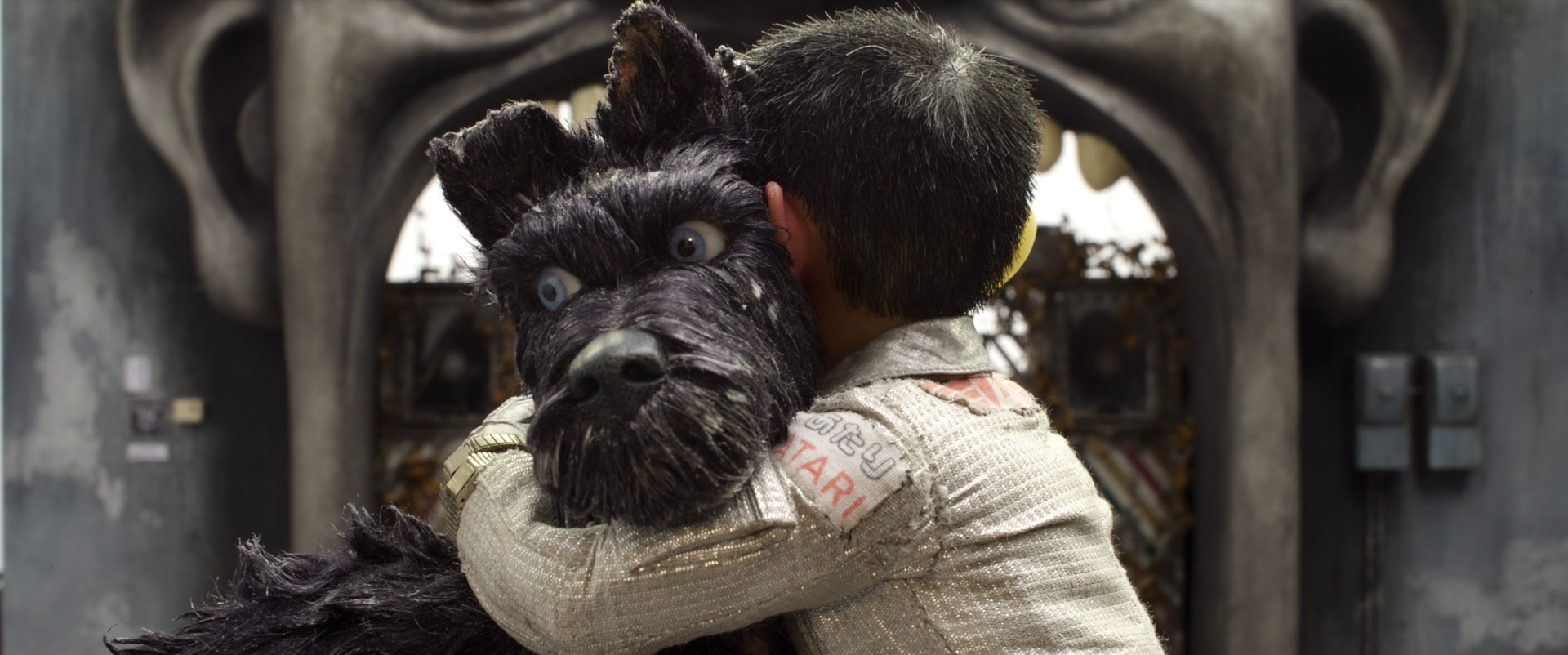
Isle of Dogs Still
The style and substance of Wes Anderson’s work is well established at this point. His films are colorful and symmetrical, each frame packed edge to edge with a reverential graphic aesthetic, a design language built atop modernist furnishings and drapery; he works with a revolving murderer’s row of comic powerhouses, his own little repertory of collaborators; and there will always be a great adventure, one where dangers abound and the wounds will cut just deep enough.
Yes, Isle of Dogs, which had its North American premiere this past weekend at SXSW, fits unmistakably in the Anderson canon; if you like his films you’ll continue to do so here. What is surprising, though, is that built atop the recognizable aesthetic is something I did not expect to find: a political message. In this sense, though perhaps not the most satisfying of Anderson’s work, the film may be his most exciting. Watching a filmmaker build on everything he knows and then step out of that comfort zone to say more than you may have expected provides a unique thrill.
The film takes place in the fictional Japanese city of Megasaki. It is ruled with an iron fist by a plutocratic, cat-loving mayor, Kobayashi (Kunichi Nomura, who also co-wrote the film’s story with Anderson, Jason Schwartzman and Roman Coppola), who whips the citizens into a frenzy over an outbreak of dog flu. Ignoring his opponents, doctors representing the Science Party, he banishes all dogs to Trash Island, a literal dump that has been polluted by various Kobayashi enterprises. We learn later that the mayor’s plotting has more to do with enriching himself than any ideological bent.
On Trash Island, we meet Chief (Bryan Cranston), Rex (Edward Norton), Duke (Jeff Goldblum), Boss (Bill Murray) and King (Bob Balaban), a pack of dogs that roam the refuse, searching for food scraps, longing for a purpose. Adventure presents itself when a young pilot, Atari (Koyu Rankin), crash lands on the isle, looking for his lost dog, Spots (Liev Schreiber). The pups are (mostly) game to help the young boy find his dog.
While most of Megasaki’s residents seem to have made peace with the expulsion of the dogs, there is a resistance movement afoot, led by a young foreign exchange student, Tracy (Greta Gerwig). Working for her school newspaper, she pulls at the thread of corruption that has led to the mass dog deportation. Tracy’s journalism quickly morphs into activism once she sees that adults around her have grown complacent. She springs into action, leading up to what has now become a classic Anderson fireworks display of a climax.
Politics has become, perhaps irrevocably, a dominant aspect of American daily life. It is fashionable to know the ever-growing cast of characters in the world of the political; opinions, however ill-informed, have become the coin of the realm. Personally, I am so inundated by news that I can’t tell if I’m merely impressing my own mental state, one awash in names and details and tick-tock reportage, upon this filn. I don’t think so, though. Isle of Dogs feels like a warning of where authoritarianism leads (and how to fight it).1
While many evils are timeless and make for great cinema, Kobayashi feels like a unique villain for our era. Take your pick of kleptocrat, at home or abroad, and you’ll begin to see the similarities. He is made all the more difficult to defeat by the fact that he rose to power not despite the will of the people, but because of it. Only the children of Megasaki have the fortitude to stand up to such a foe. Such may be the case in real life as well.
As I’ve mentioned, the Anderson hallmarks are all there. The film’s plot burns nice and slow as we learn more about what makes each character (and there are many!) tick. Everything occurs in its rightful order, which is to say not always chronologically, for the biggest emotional impact. The result is a film sprinkled with perfectly executed moments of laughter, cheers and tears. It’s an all ages2 escapade that will leave you with plenty to talk about when the lights come up.
Wes Anderson’s filmmaking journey is certainly never dull. One can always rely on him for a visual feast set to musical deep cuts (there’s plenty of vinyl, as well as what sounds like a new, or at least less heard, rendition of Sergei Prokofiev’s first film score) with moments of raw emotional revelation. That palette has become so second nature to the director, he can now imbue his stories with vital and current considerations. That may be the most impressive aspect of this latest outing. I, for one, am excited to see where he goes next.
-
One can also discern a message of protecting the planet, though, weirdly, for a film set on a place called Trash Island, that seems to be somewhat secondary. ↩︎
-
Perhaps now is a good place to mention that the film is not entirely in English. Every character speaks his or her native tongue, which means most humans speak Japanese. One should trust Mr. Anderson on this: English speakers will not be in the dark. There are no subtitles, but everything is made clear through some form of translation. Younger viewers, I would guess, likely won’t even notice the film feels foreign to any degree. ↩︎
Review: Pass Over
Spike Lee’s Pass Over is a beautifully filmed version of a powerful play. At times it feels like a concert film. The audience is a central character, and not just in the theater. The film opens with scenes of young audience members preparing to get on busses to head to The Steppenwolf Theatre to see the play. We see as they get ready and we hear their laughter, their gasps, their concern.
Antoinette Nwandu’s play (directed for the stage by Danya Taymor) is about two young black men, Moses (Jon Michael Hill) and Kitch (Julian Parker), forever stuck on a Chicago block. Their existential threat is police violence. Almost everyone they know has been killed, so they stay on their block, passing the time talking about what they’ll do in the “promised land.”
The two have cooked up a sort of biblical mythos about life outside of the block. Old testament references abound (it is, after all, a play called “Pass Over” with a main character named Moses), but the concerns are immediate. Here, the promised land is a state of mind, a place where the threat of being gunned down doesn’t lurk around the corner. It’s also a place where you can order champagne on ice from room service. The two are not mutually exclusive.
Moses and Kitch aren’t the only characters on the block. There are two white men who come in and out of their lives. The first, Mister (played by Ryan Hallahan) is wealthy and aloof, decked out in full seersucker and hat, carrying a comically oversized picnic basket. He claims to be lost on the way to his mother’s house, and offers the bounty in his basket to the men. They are mistrustful, but they spend time with him, enjoying the food. He has all their favorites, after all.
The second is Ossifer (here played by Blake DeLong; on stage both parts were portrayed by Hallahan), a police officer who checks in on Moses and Kitch to keep them in their place. He is an unchecked racist, finding glee in using racial epithets and ensuring the men never leave the block.
The power of the film comes from the oscillations of racism between Mister and Ossifer. One is obvious, while the other is dangerous. Moses and Kitch come to learn that the threat of gun violence may be the least of their worries in this life. Maybe there is no promised land for two black men so long as the Misters of the world are out there, enjoying their picnic baskets.
Adding footage of the audience before the show is a disarming and brilliant conceit. It reminds the viewer that this performance is not just for them, but for a different audience, one that is mostly young, black and living through struggles similar to Moses and Kitch. There is much of the film that is extremely current (direct reference is made to Colin Kaepernick’s protests) and may not stand the test of time, but seeing the audience experience the play adds a timeless weight to the story.
The most important thing one can do when leaving Pass Over is discuss it. There is a great deal to unpack, and some conclusions may not be as obvious as one thinks. The real gift of Lee’s film is bringing this story to audiences around the world. See it when it’s available to you.
Amazon and the $50 Million Film
Jeffrey Dastin and Jessica Toonkel, reporting for Reuters:
Amazon expects to go after films with budgets in the $50 million range at the expense of indie projects costing around $5 million, one person familiar with the plans said on the condition of anonymity.
Already this news is garnering some jeers, but I welcome it. I hope Amazon doesn’t totally get out of the $5 million and under film game, but projects in that budget range are pretty well served today.
The $50 million film, on the other hand, is the diciest bet in the business. Audiences keep proving that the more you spend on a film, the more likely you are to see a healthy return. This is why there are so many tentpoles with budgets in the stratosphere. In fact, of the top ten highest grossing films1 of 2017, only one came in at or under the $50 million mark: Andy Muschietti’s adaptation of It, with an estimated budget of $35 million. The expensive films tend to be a sure thing.2
Amazon has proven itself an adept and energetic studio. I particularly like that they haven’t cynically written off theatrical runs for their projects (ahem, Netflix). Studios don’t really takes risks in this budget range. Steven Spielberg’s The Post cost an estimated $50 million to make, for example, but a Tom Hanks, Meryl Streep film with one of the most successful filmmakers of all time at the helm isn’t exactly a risk.
Amazon can afford to take the chance on the bigger films we aren’t seeing. I’m excited to see what filmmakers can do with larger budgets on projects that won’t sink a studio if they fail.
Update: Deadline got a statement from Jason Ropell at Amazon, confirming the part of this I like and denying the part I don’t.
Said Ropell, who is en route to Sundance, for the purpose of watching and possibly buying films here: “We are not abandoning the indie space, we are increasing the potential size of the audience for our films; that in some cases involves higher budgets, but in others not. It’s about the potential for the film not the cost.”
Will definitely be interesting to see what comes out of this new push.
-
All sequels or reboots, naturally. ↩︎
-
Credit where it’s due: IMDb claims Despicable Me 3 had a budget of $80 million and Jumanji: Welcome to the Jungle cost some $90 million. I’m shocked either was made for under $100 million. And for what it’s worth, there’s no estimated budget for Star Wars: The Last Jedi but it’s safe to assume it cost…a lot. ↩︎